Rambai Ranveer the barefoot runner whose quest for her daughters’ education sparked a national conversation on opportunity and inequality

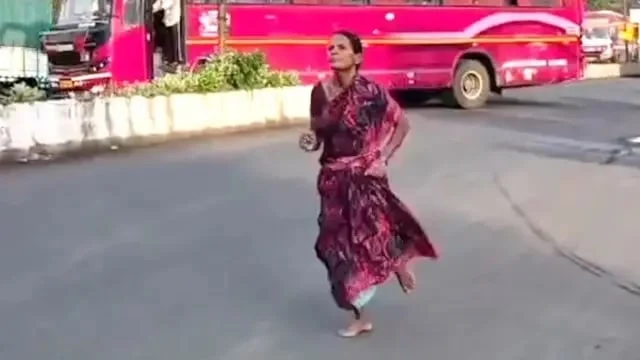
In the rural landscapes of Maharashtra, India, a 47-year-old widow named Rambai Ranveer recently stepped onto a makeshift running track with no formal training, no athletic gear, and no shoes. Her objective was not athletic glory or personal records; it was a modest financial reward offered to the winner of a local community race. By the time she crossed the finish line in first place, having run three kilometers barefoot, she had unknowingly ignited a profound national dialogue regarding the state of education, the burden of poverty, and the extremes to which parents will go to secure a future for their children.
The Chronology of an Unlikely Triumph
The events unfolded in August during a local community race in Maharashtra. For Rambai Ranveer, the decision to participate was born out of pure necessity. As a widow struggling to provide for her two daughters, she lived in a state of constant financial precariousness. When she learned of a local running event that offered a cash prize of 3,000 rupees (approximately $36 USD), she recognized a rare opportunity to bridge the gap in her household budget.
Without access to professional coaching or even a basic pair of running shoes, Ranveer arrived at the starting line alongside younger, more equipped competitors. Observers noted that her form was unconventional, dictated by the harsh reality of running barefoot on unforgiving terrain. Despite the lack of preparation, she maintained a steady pace, eventually pulling ahead of the pack. When she finished the race, she was not just the winner; she was a symbol of raw, unyielding human persistence. The prize money, while objectively small, represented the difference between her daughter being able to afford necessary study materials or falling behind in her government recruitment exam preparations.
The Economic Reality of Education in India
To understand the weight of Ranveer’s achievement, one must look at the broader economic landscape of India’s education sector. While the Indian government has made significant strides in improving primary school enrollment, the cost of higher education and specialized training remains a prohibitive barrier for many low-income families.
The 3,000 rupees won by Ranveer, while helpful for stationery and basic supplies, barely scratches the surface of the costs associated with higher education. In India, families often face a "hidden cost of education," which includes private tutoring, coaching centers for competitive exams, and transport. For families in rural regions, these costs can represent a significant portion of their annual income.
Data from the National Sample Survey Office (NSSO) in India indicates that the average household expenditure on education has been rising consistently. For families in the lowest income quintile, the pursuit of a university degree or technical certification often requires debt-leveraging or, as in the case of Ranveer, the pursuit of ad-hoc income sources. The irony of the situation was not lost on the Indian public: a mother was forced to engage in physical labor—a race—to subsidize the cost of the very system that is meant to act as a social equalizer.
The Social Media Catalyst and Public Discourse
The narrative took a significant turn when video footage of Ranveer’s barefoot race surfaced on social media platforms. The imagery—a middle-aged woman sprinting across dirt, clad in a simple sari—went viral almost instantly. The reaction from the Indian public was a volatile mix of admiration and indignation.
On platforms like X (formerly Twitter) and Facebook, the discourse quickly shifted from celebrating an individual athlete to critiquing the systemic failures of the state. One prominent social media comment, which gained significant traction, asked, "Is this a moment of glory, or is it a source of shame for us as a society?" This sentiment captured the collective conscience of a nation struggling to reconcile its rapid economic growth with the persistent poverty that keeps millions of its citizens in a cycle of subsistence living.
Sociologists and policy analysts argue that Ranveer’s story serves as a mirror for the "aspirational India." It highlights the desperation embedded in the middle-class dream: the belief that education is the only viable path out of poverty, regardless of the personal cost. When parents are forced to perform extraordinary, physical feats to pay for textbooks, the social contract, which suggests that the state should facilitate accessible learning, appears strained.
The Burden of Care: A Mother’s Perspective
Ranveer’s motivation remains grounded in the maternal drive to provide for her children. Her daughters, one of whom is currently navigating the rigorous process of preparing for government service exams, represent the next generation of India’s workforce. In many rural households, these exams are viewed as the "golden ticket" to stability.
However, the path to these exams is paved with financial hurdles. Preparation often requires expensive coaching classes, as the school curriculum alone is frequently insufficient for the competitive nature of these examinations. By running, Ranveer was essentially acting as a primary investor in her daughter’s future. This level of sacrifice is not uncommon in rural India, but the visibility of her race brought the quiet, daily struggle into the public eye.
Institutional Responses and Institutional Failure
As the story of the "barefoot runner" spread, it caught the attention of local government officials and regional media. While there were anecdotal reports of some officials acknowledging the need for better support for rural athletes and education funding, there has been no widespread institutional overhaul directly resulting from this specific incident.
Critics of the current system point out that relying on individual acts of heroism to solve systemic problems is a dangerous precedent. When the media celebrates a story like Ranveer’s as "inspiring," it risks romanticizing a situation that is fundamentally unjust. From a policy perspective, the challenge is to move away from individual charity and toward structural reform. This would involve increasing the reach of government scholarship programs, subsidizing educational materials more effectively, and ensuring that rural communities have access to the same training and athletic facilities as their urban counterparts.
Implications for the Future of Sport and Education
The incident has also sparked a localized discussion about the importance of sports infrastructure in rural India. If Ranveer possessed the raw talent to win a race without training, imagine the potential of rural youth if they were provided with proper shoes, nutrition, and coaching.
The Indian government has, in recent years, launched initiatives like "Khelo India," aimed at reviving the sports culture in the country at the grassroots level. However, experts argue that such programs often prioritize elite-level development over the needs of the average citizen. Ranveer’s story serves as a reminder that for many, sports are not just about recreation or health; they are a vital, albeit precarious, economic tool.
Conclusion: A Symbol of Enduring Resilience
Rambai Ranveer did not set out to become a symbol of educational inequality or a catalyst for national debate. She set out to buy books. Her journey—from the starting line of a dusty track in Maharashtra to the screens of millions—is a testament to the resilience of the human spirit in the face of systemic adversity.
As the news cycle moves on, the fundamental issues highlighted by her race remain. The cost of education continues to rise, the gap between the affluent and the struggling remains wide, and mothers like Ranveer continue to bear the weight of these disparities on their own shoulders. While her victory on the track was temporary, the conversation she ignited is essential. It serves as a recurring reminder that a society’s progress is not measured by its top-tier achievements, but by the efforts required for its most vulnerable members to reach the starting line.
For now, the books have been purchased, and her daughter continues to study, hopeful that the effort exerted by her mother will translate into a career that offers the stability they have long sought. Whether this story leads to concrete policy change remains to be seen, but the image of the barefoot runner will likely remain an enduring, haunting symbol of the price of progress in modern India. The challenge for policymakers and society at large is to ensure that in the future, the path to education is paved not with the desperation of parents, but with the support of a system that recognizes the potential of every citizen.