MSI Unveils PRO MAX Ultrawide QD-OLED Monitor with Seamless macOS Integration and Advanced Productivity Features

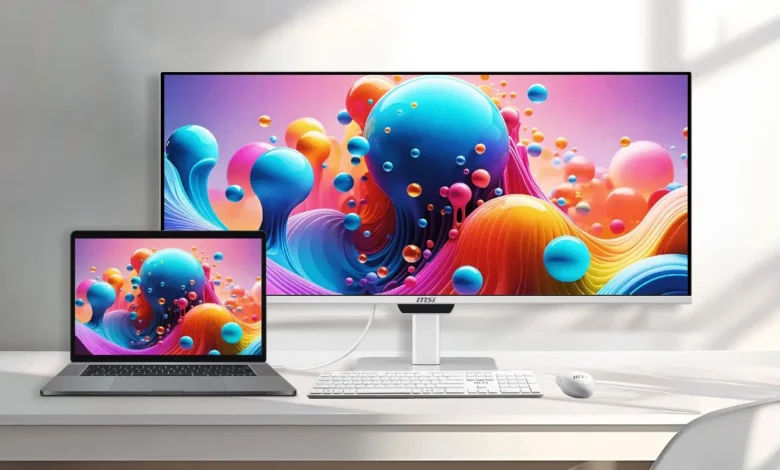
The consumer electronics and high-performance hardware market has long presented a persistent friction point for professionals and creatives operating within the Apple ecosystem: the seamless integration of third-party external monitors. Historically, Mac users connecting external ultrawide displays have been forced to rely on cumbersome physical buttons located on the back or bottom bezels of monitors simply to adjust basic display metrics such as screen brightness or audio volume. Display manufacturers have frequently optimized their hardware for Windows-based systems, leaving macOS users to navigate proprietary third-party utilities or tolerate manual hardware adjustments. Addressing this longstanding ergonomic hurdle, micro-star international (MSI) has officially introduced its latest flagship display solution, the MSI PRO MAX, an ultrawide monitor engineered specifically to bridge the operational gap between Windows-centric hardware designs and the native macOS user experience.
Announced to cater to the growing demographic of cross-platform professionals, hybrid workers, and creative power users, the MSI PRO MAX seeks to redefine desktop productivity. By introducing native macOS system control for display parameters, MSI is directly targeting a consumer base that values workflow continuity and minimalist desk setups. The release of the PRO MAX reflects a broader industry trend where hardware manufacturers are increasingly prioritizing cross-ecosystem compatibility, recognizing that many modern professionals utilize macOS laptops alongside multi-OS desktop configurations or external peripherals.
Main Facts and Display Architecture
At the structural core of the MSI PRO MAX lies a 34-inch QD-OLED (Quantum Dot Organic Light Emitting Diode) panel, delivering an immersive ultrawide canvas suited for multitasking, video editing, and complex data analysis. The display supports a native resolution of 3440 by 1440 pixels, categorizing it as a Wide Quad High Definition (WQHD) monitor with a standard 21:9 aspect ratio. For motion handling and fluid visual feedback, the panel supports a maximum refresh rate of 144 Hz, ensuring smooth cursor tracking, window dragging, and multimedia playback.
Despite the advanced nature of the QD-OLED technology utilized, industry analysts and display enthusiasts have noted certain specifications relative to the high standards set by Apple’s proprietary Retina displays. With a pixel density hovering around 110 pixels per inch (PPI), the PRO MAX trades extreme microscopic text sharpness for expansive screen real estate. However, MSI has proactively mitigated historical drawbacks associated with early-generation QD-OLED panels by incorporating an RGB stripe sub-pixel layout. This architectural refinement directly addresses the notorious "color fringing" artifact—a phenomenon where fine text strings exhibited unwanted chromatic aberrations along their edges due to triangular sub-pixel geometries.
In terms of visual fidelity and color reproduction, the MSI PRO MAX boasts formidable factory specifications. The panel is engineered to achieve a wide color gamut coverage of 99 percent for the DCI-P3 color space and 97.4 percent for Adobe RGB, making it a viable tool for color-critical workflows such as photo retouching, graphic design, and digital filmmaking. Out-of-the-box color accuracy is rated at a Delta E value of less than 2, ensuring precise tonal representation from the moment the device is unboxed, though professional colorists demanding absolute calibration accuracy will still benefit from hardware profiling.
High Dynamic Range (HDR) performance is anchored by a peak brightness capability of up to 1,300 nits when illuminating small, localized areas of the screen, providing punchy highlights in compatible media. For standard dynamic range (SDR) content across a full white window, the monitor operates at a sustained brightness of 300 nits, which is optimized for controlled indoor office environments and studio spaces.

Seamless macOS Integration and Ergonomic Versatility
The definitive selling point of the MSI PRO MAX is not merely its underlying panel technology, but its software and hardware synergy with Apple computers. By embedding specialized communication protocols within the monitor’s firmware, MSI allows Mac users to adjust display brightness and speaker volume directly from macOS system controls, mimicking the native behavior of Apple’s own Studio Display or Pro Display XDR. This eliminates the repetitive friction of reaching behind the chassis to manipulate on-screen display (OSD) joysticks or toggle external software patches.
Complementing this software integration is a comprehensive mechanical design aimed at maximizing ergonomic comfort. The monitor chassis is finished in a clean, minimalist white aesthetic designed to harmonize with contemporary desktop aesthetics. It is anchored by a robust stand offering up to 130 mm of height adjustment, allowing users to align the center of the screen precisely with their eye level. Furthermore, the display supports flexible positioning adjustments, including a swivel range of up to 30 degrees, a pivot capability of 10 degrees, and a tilt adjustment ranging from minus 5 to 20 degrees. For users seeking ultimate desk minimalism, the chassis includes VESA mounting compatibility for wall or articulating arm installations.
Audio capabilities are addressed via an integrated dual-speaker system, featuring two 3W built-in speakers sufficient for casual media consumption, video calls, and system notifications without cluttering the desk with external desktop monitors or soundbars. Additional health-centric features include hardware-based blue light reduction technology, which minimizes eye strain during extended work sessions without inducing severe color yellowing on the display.
Comprehensive Connectivity and Modern I/O Architecture
Modern productivity setups demand robust and versatile input/output (I/O) configurations, and the MSI PRO MAX is equipped to serve as a central desktop hub. Video input options include dual HDMI 2.1 ports and a single DisplayPort 1.4a connection, ensuring compatibility with a wide array of desktop graphics cards, gaming consoles, and professional workstations.
Crucially for laptop users, the monitor features a dual USB-C architecture supporting DisplayPort Alt Mode. One of these USB-C ports delivers up to 98 watts of Power Delivery (PD), capable of rapidly charging high-performance laptops—including the 16-inch MacBook Pro—while simultaneously transmitting video and data over a single cable. The secondary USB-C port provides a supplemental 15W power output for charging smaller peripherals or mobile devices.
The expansion capabilities are further augmented by a built-in KVM (Keyboard, Video, Mouse) switch supporting up to three distinct host devices. This allows users to connect a single keyboard and mouse set to the monitor and seamlessly control multiple computers—such as a personal Mac, a work laptop, and a desktop PC—by switching the active input source. Additional physical connectivity includes one upstream USB Type-B 3.2 Gen 1 port, four downstream USB Type-A 3.2 Gen 2 ports for high-speed peripheral data transfer, and a standard 3.5mm audio jack for wired headphones or external desktop speaker systems.
Background Context and Market Implications
The launch of the MSI PRO MAX arrives at a critical juncture in the PC monitor market. Over the past several years, OLED and QD-OLED technologies have transitioned from enthusiast gaming niches to mainstream professional adoption. However, manufacturers have historically bifurcated their marketing strategies: ultra-fast, high-refresh-rate panels were marketed exclusively to competitive PC gamers, while color-accurate, high-resolution panels were pitched toward creative professionals.

By combining a 144 Hz refresh rate, a widescreen 21:9 WQHD canvas, premium HDR performance, and dedicated Mac compatibility, MSI is attempting to capture the lucrative hybrid consumer segment. Professionals today frequently blur the lines between corporate productivity tasks, creative content creation, and after-hours entertainment. A monitor that accommodates the specific hardware behaviors of macOS while delivering the fluid response times demanded by modern operating systems represents a significant strategic pivot.
Furthermore, the integration of high-wattage USB-C Power Delivery reflects the evolving demands of remote and hybrid workforces. As desk spaces shrink and the desire for cable management simplification grows, the single-cable docking solution offered by the PRO MAX eliminates the need for separate desktop docking stations.
Fact-Based Analysis of Broader Industry Impact
Industry observers note that while the MSI PRO MAX introduces welcome conveniences for Mac users, it also sets a new benchmark for competing display manufacturers. Apple’s proprietary external displays have long faced criticism for their elevated retail pricing relative to their hardware specifications. By offering a high-performance QD-OLED alternative equipped with native macOS brightness and volume control, MSI demonstrates that third-party manufacturers can successfully bridge the operational divide traditionally guarded by Apple’s proprietary ecosystem.
Nevertheless, challenges remain for prospective buyers. While the inclusion of an RGB stripe layout significantly improves text rendering compared to earlier QD-OLED iterations, users transitioning directly from high-PPI Retina panels may still perceive a slight difference in textual crispness. Additionally, the 300-nit full-window SDR brightness, while standard for OLED technology due to automatic brightness limiter (ABL) constraints, requires careful placement in brightly lit office spaces with direct sunlight exposure.
Ultimately, the MSI PRO MAX alters the value proposition for ultrawide monitor adoption within the Apple community. By addressing the granular ergonomic frustrations of daily usage—such as system-level volume and brightness control—MSI has transformed what could have been a standard hardware specification update into a targeted productivity solution. As shipments commence and the monitor populates retail shelves, its market reception will likely dictate whether other major display manufacturers adopt similar cross-platform integration strategies in future hardware cycles.